How to Create, Edit, and Publish Professional Surveys with Elestiva in 2026
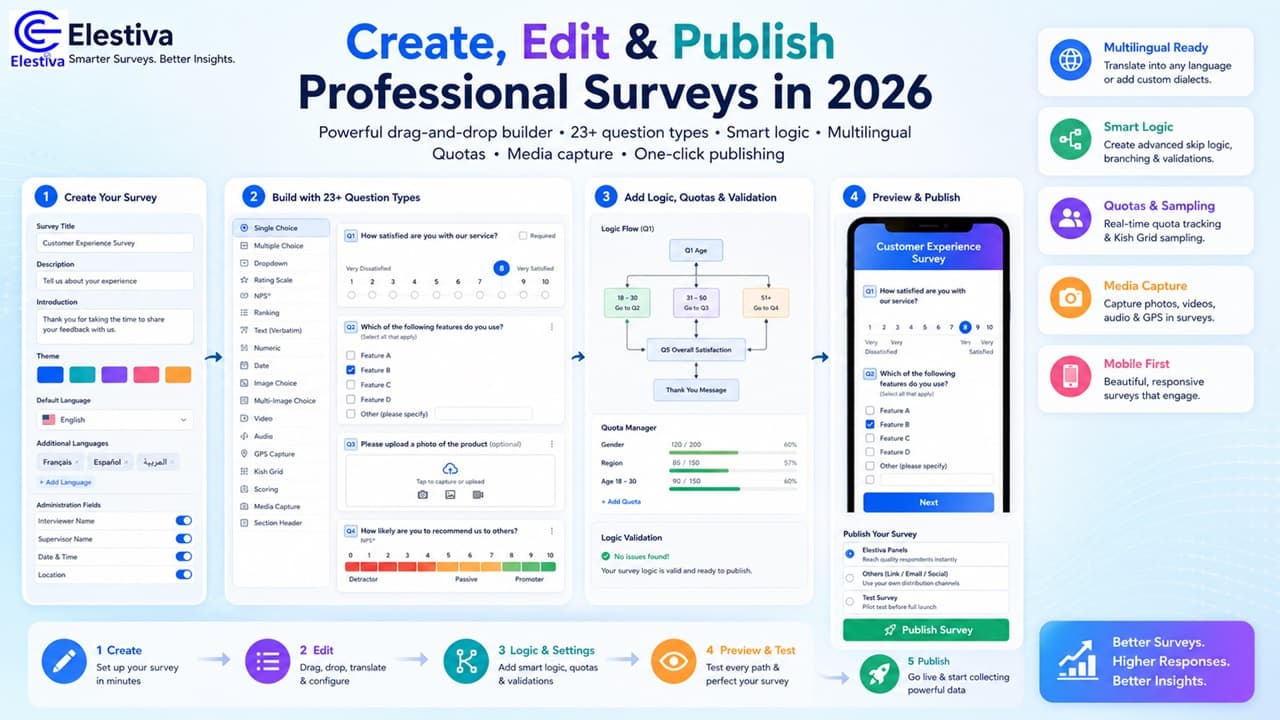
The world of online surveys has evolved dramatically. With advanced logic, mobile-first design, built-in translation, and AI-powered features, creating surveys that people actually want to complete is now easier — and more important — than ever.
Why Survey Quality Matters More Than Ever
Poorly designed surveys lead to low completion rates, bad data, and frustrated respondents. In 2026, respondents expect:
- Mobile-friendly, beautiful design
- Smart question logic and skip patterns
- Fast loading and smooth experience
- Clear, respectful, and engaging questions
- Support for their preferred language
The Complete Workflow: Create → Edit → Publish with Elestiva
Elestiva gives you everything you need in one intuitive platform — whether you’re building customer satisfaction surveys, employee engagement studies, market research, or complex field surveys with Kish Grid sampling.
1. Creating a New Survey – Fast and Professional Setup
Start in the Survey Builder. The interface is clean, visual, and powerful.
- Enter your survey title, description, and introduction
- Choose from beautiful themes (fully customizable)
- Set your default language and instantly add custom languages — translations sync automatically across options, statements, images, and labels
- Configure administration fields (interviewer/supervisor details, quality control, sampling info) with fully editable labels
Everything auto-saves as a draft in real time with smart size monitoring so you never lose work.
2. Building Questions – 23+ Advanced Types with Drag & Drop
Drag any question type directly from the tool palette into your form.
Supported question types include:
- Single & Multiple Choice (radio, checkbox, or dropdown)
- Single/Multiple Choice Grids & Loops
- Ranking questions
- Scale (1–10 with custom labels)
- NPS (Net Promoter Score)
- Numeric, Date, Text (verbatim)
- Image Choice & Multi-Image Choice (with direct uploads)
- Video & Audio questions (URL or file upload)
- GPS coordinate capture
- Kish Grid – ideal for household sampling
- Scoring questions with automatic total calculation
- Media Capture – let respondents take photos or videos inside the survey
- Section headers with rich descriptions
Every question supports full per-language translations with automatic syncing, bulk option import, large option lists, and custom validation.
3. Adding Intelligence: Logic, Quotas & Validation
Elestiva isn’t just beautiful — it’s smart.
- Logic Rules — Build complex skip logic, show/hide questions, and branching
- Logic Validation panel instantly shows conflicts
- Quota Manager — Set real-time quotas by demographics, regions, or custom variables
4. Editing an Existing Survey – Full Power, Zero Friction
Open any saved survey in Survey Detail mode at Active Surveys and enjoy the same powerful tools:
- Drag-and-drop reordering
- Edit any question in place
- Add new questions anywhere
- Switch languages instantly while keeping all translations perfectly synced
- Live Preview of the exact respondent experience
- One-click PDF export for stakeholders
Pro tip: Use Save As New Survey to adopt templates as your own survey or create a new wave of the same survey.
5. Preview, Test & Polish Before Publishing
- Open Preview Mode to experience the survey exactly as respondents will
- Test logic flows and skip patterns live
- Download a beautifully formatted PDF for review
6. Publishing Your Survey – One Click to Live Data
When you’re ready, hit Publish from your Active Surveys dashboard and choose your distribution method:
- Elestiva Panels — reach high-quality respondents instantly
- Others — use your own links or email lists
- Test Survey — perfect for piloting
You can manage all your published surveys at Published Surveys.
Pro Tips for 2026-Level Response Rates
- Keep surveys mobile-first (all Elestiva themes are fully responsive)
- Use media capture and image choice for higher engagement
- Enable multi-language support so respondents answer in their preferred language
- Leverage Kish Grid and quotas for scientifically balanced samples
- Always preview, pilot test, and keep questions short and respectful
Ready to Build Your Next Great Survey?
Create your first professional survey in minutes — completely free to start.
Already have a draft? Open your Active Surveys and start editing, publishing, or distributing instantly.
The best data comes from the best surveys.
Build yours with Elestiva in 2026 — and watch response rates soar.
Written by the Elestiva Team • May 2022